
Best ad spy tools in 2026: an honest comparison of prices and platforms
LLucas Reda · 5 Nov · 10 min
Two free ways to see the active ads of any Instagram account, in the app and in the Meta Ad Library, plus how to read what you find.
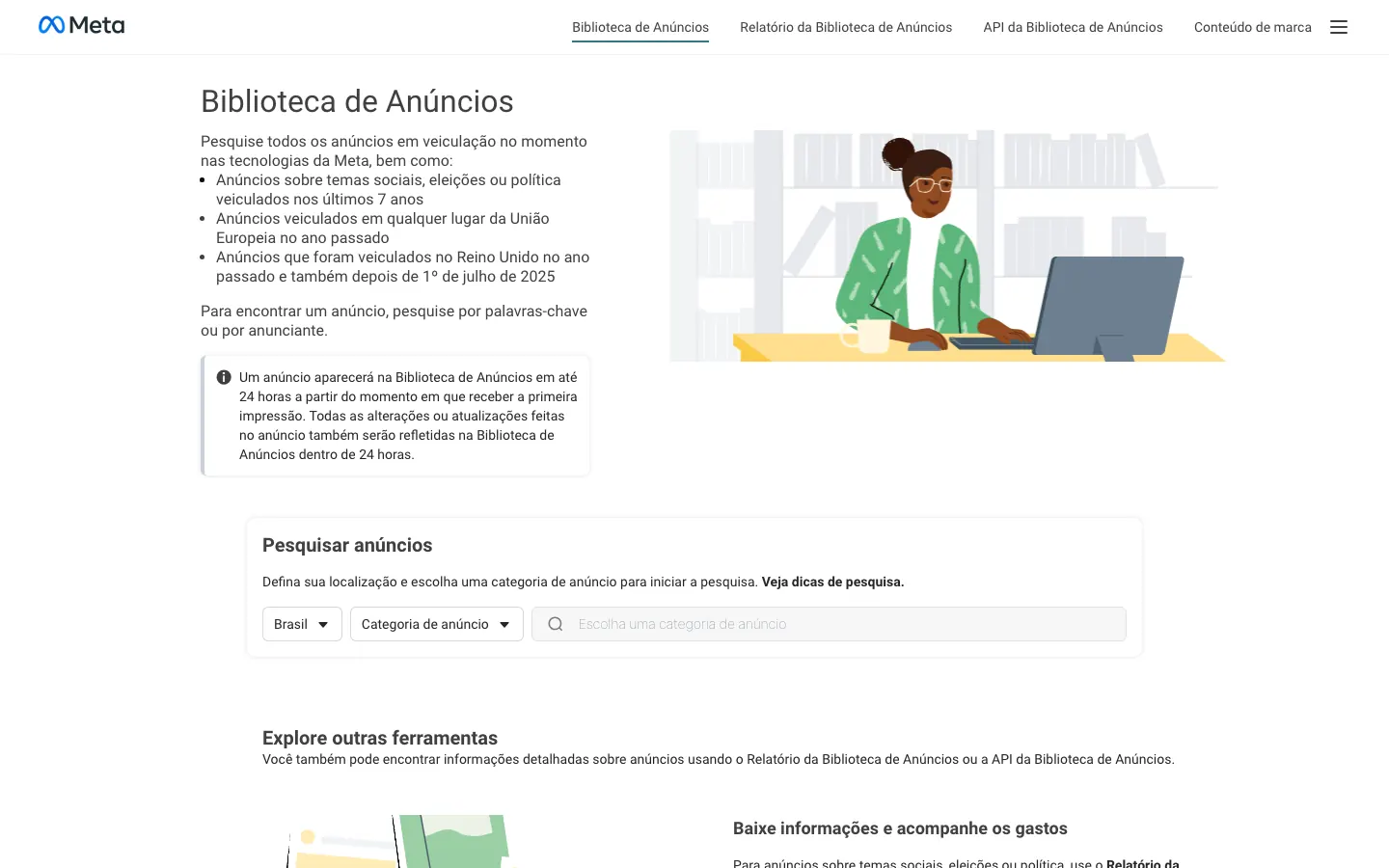
Short answer: in the app, open your competitor's profile, tap the three dots (⋯) in the top right, choose About this account, then Active ads. On desktop, go to the Meta Ad Library, pick the country and "All ads", search for the brand's Facebook Page name (not the @ handle) and filter by Platform: Instagram. Both routes are free and show only ads that are running right now.
The rest of this guide is what separates looking from learning: what the library shows and what it hides, why a search sometimes returns nothing, how to read start dates and versions, and how to build a competitor file you check every week instead of starting from scratch.
Everything here is public data. Meta keeps active ads open to anyone for transparency. Looking at a competitor's ads doesn't require access to anyone's account, and it's exactly the kind of "spy" FreeSpy works with: ads, not people.
This is the fastest option when you already know who the competitor is and your phone is in your hand. The steps from the Instagram Help Center:
There's a shortcut most people miss: when one of the competitor's ads shows up in your feed, tap the three dots on the ad itself. In many cases that leads to the same "About this account" screen, and from there to the active ads.
Three details the Help Center confirms that save a lot of confusion:
The same screen shows when the account was created, the country it's based in and how many times the username has changed (Instagram Help). For competitor research that's gold: an account created a few months ago that has changed its name several times is a very different player from a brand that's been around for years.
It's almost always one of these:
There's one special case. According to Instagram Help, a professional account can boost a post for the first time without connecting an ad account or a Facebook Page. Outside that case, practically every ad running on Instagram is tied to a Facebook Page, including ads that only appear on Instagram.
In practice that means two things. First, the in-app shortcut is the best route for Instagram-only brands, because it takes you straight to the right advertiser. Second, if you search the library and find nothing, the problem is rarely "they don't advertise": the Facebook Page just has a different name. Meta doesn't clearly document how an advertiser without a Page appears in search, so try both names: the Page name and the profile name.
For real research, desktop wins. Bigger screen, full filters, and you can open ten advertisers in tabs.
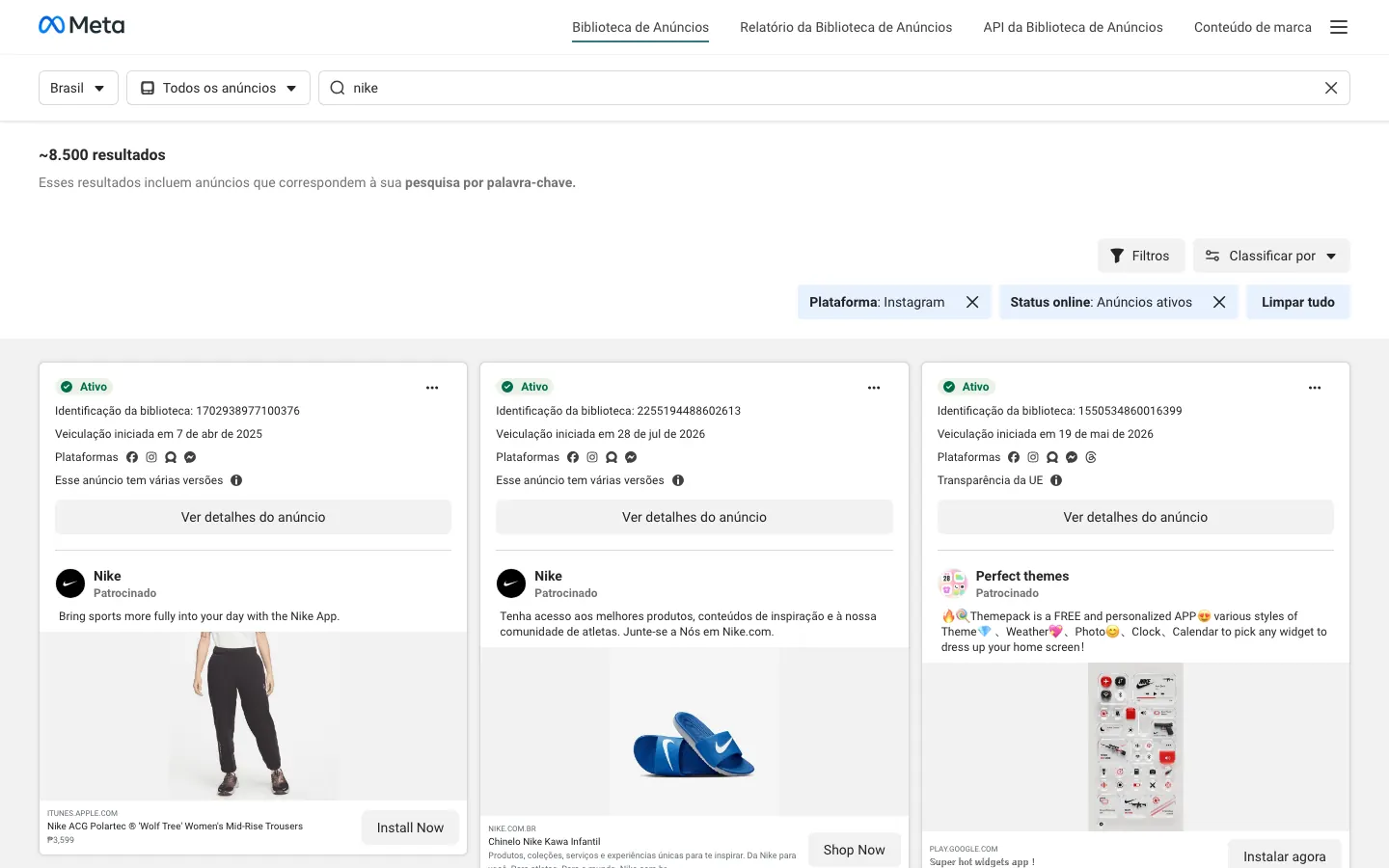
Notice the difference between hitting Enter and clicking the suggested Page. Hitting Enter runs a keyword search: the library returns every ad that mentions the term in its text, including resellers, affiliates and anyone who just names the brand. Clicking the Page shows only what that advertiser published. To study a competitor, you almost always want the second one.
Library search matches the advertiser's Facebook Page name. The Instagram handle is often different: "brandxyz.official" on Instagram may be "Brand XYZ" on Facebook, or even the parent company that runs several brands. If the handle returns nothing, try:
Platform: Instagram shows ads running on Instagram. It doesn't mean "only on Instagram". Most advertisers leave placements on automatic, so the same ad carries the Facebook, Instagram, Messenger and Threads icons at once. If you want to know what's Instagram-only, look at each card's icons: an ad with a single Instagram icon was placed there on purpose.
This is where most false expectations come from. The library was built for transparency, not market intelligence. It shows a lot about the creative and almost nothing about results.
| You can see | You can't see |
|---|---|
| Any advertiser's active ads | Commercial ads that have stopped running (outside the EU and UK) |
| The date the ad started running | Daily or total spend |
| Which platforms it runs on (icons) | The exact placement it was delivered in (Feed, Stories or Reels) |
| The creative, copy, headline and button | Likes, comments and shares on the ad |
| How many ads use the same creative and text | Interests, custom and lookalike audiences |
| Whether the ad has multiple versions | CPA, ROAS, conversion rate |
| In the EU: estimated reach, audience age, gender and country, who pays and who benefits | That transparency data for ads seen only outside the EU |
| For political ads: spend and reach ranges | Spend and reach for a regular commercial ad |
Checked in October 2026 on the Meta Transparency Center and in the library itself.
Two rows deserve a note.
Political and issue ads are stored for seven years, with spend and reach ranges. That doesn't apply to your competitor's product ads.
Ads shown in the European Union fall under the Digital Services Act (DSA). Because of it, Meta keeps those ads in the library for a year after their last impression and shows a European Union transparency section in the ad details: estimated reach, the age, gender and location used for targeting, and who paid for the ad. If your competitor also sells in Germany, France or Ireland, open those details. You'll get an estimated reach figure that simply doesn't exist for ads running only in the US.
Both look the same in the library, but they tell you different things about the competitor.
A boosted post comes from the "Boost" button inside the app. The ad is a post that already lives on the profile's grid. Typical signs: the copy matches the post caption, the button is often "Visit profile", "Send message" or "Learn more", and the creative looks like organic content.
An Ads Manager ad is built by someone who runs paid traffic seriously. It often doesn't appear on the profile at all (the classic "dark post"). Typical signs: several ads with the same creative and different copy, a "Shop now" button pointing to the store, versions of the same video with different hooks, and multiple placements.
Why it matters: a competitor that only boosts posts is doing brand awareness. A competitor with ten versions of the same video, live for weeks, is testing and scaling an offer. The second one is who you learn from.
The library shows the platform, not the placement. It won't say "this ran in Reels". You can infer it from the format, though:
When a competitor runs the same video in both 9:16 and 4:5, they're covering both worlds with one piece. That's a good sign the creative was worth the effort of adapting.
Finding the ad is the easy part. Reading it is what turns into a test.
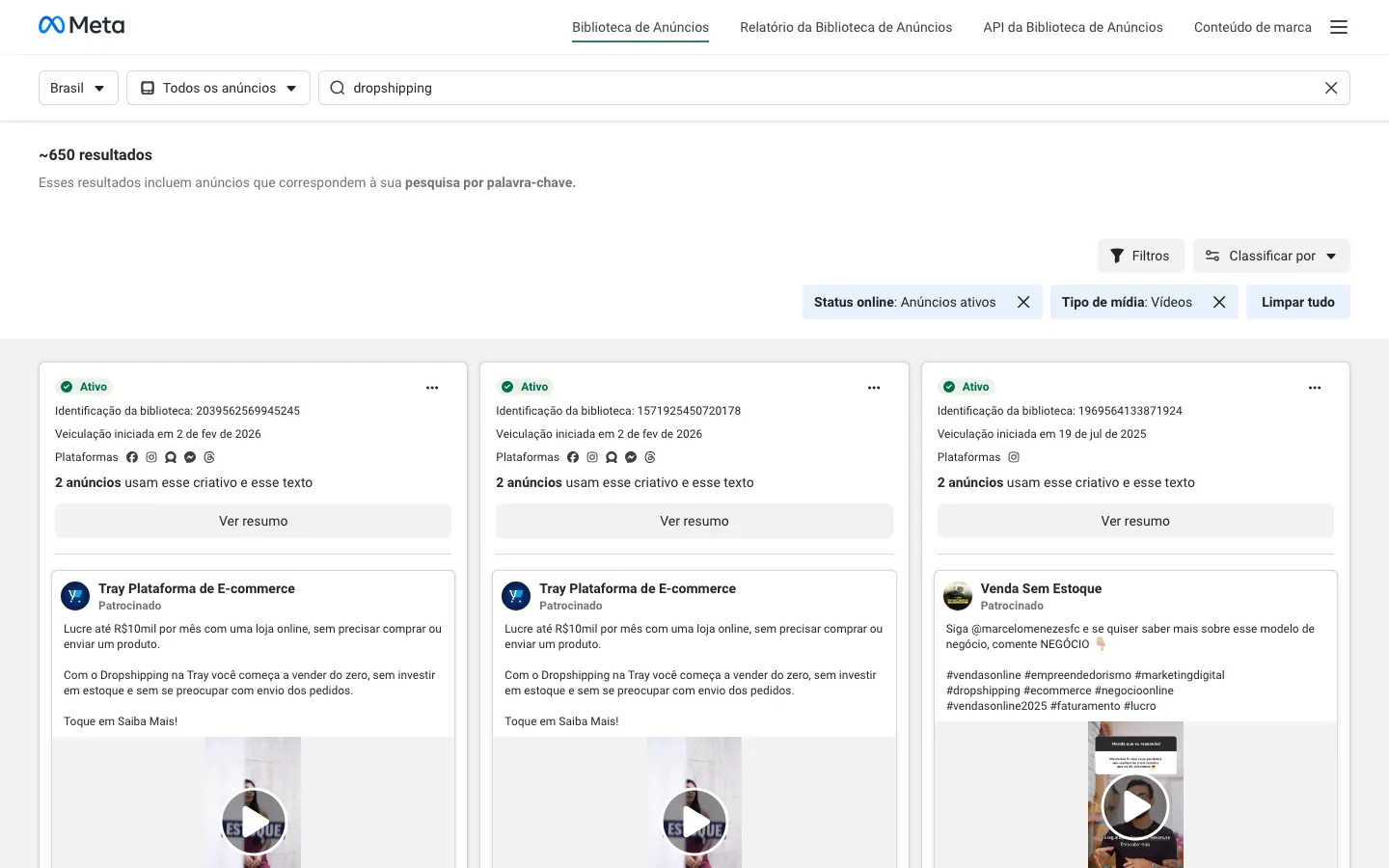
Every card shows the date the ad started running. Count the days to today. An ad that loses money usually gets turned off within days, so the longer it's been live, the more likely it's paying for itself. A three-day-old ad tells you nothing. A two-month-old ad that's still active has survived several rounds of cuts. We cover the full logic in days live: the most honest signal.
Be careful with big brands. A well-known brand may keep a brand ad running for reasons that have nothing to do with direct sales.
When the library groups identical ads, it shows how many there are and swaps the button for a summary view. It means the advertiser launched the same creative several times, in different ad sets or campaigns. Duplicating is the most common way to scale. A creative running in many copies for weeks is what the competitor is betting on. More in what creative copies mean.
That's different from copies. It's one ad with variations in copy, headline or image, usually from Meta's automatic creative features or from the advertiser's own tests. Open the ad details and compare the versions: phrases that repeat across all of them are what the advertiser treats as essential. The ones that change are what they're still testing.
When you see the same video with different copy, write down the opening of each (the part before "more"). You're watching the competitor's angle test live. Tag each one with the six creative angles: social proof, personal story, discount, authority, fear or curiosity. If one angle shows up in almost everything that's been live the longest, that's what works for that audience.
Click the button and look at the landing page. Price, offer (bundle, free shipping, guarantee) and page structure count as much as the creative. Lots of people study the video and forget that the page is what closes the sale.
Start date answers "does this sell?". Copies answer "how much are they betting on it?". Versions answer "what are they still testing?".
Looking once is curiosity. The value is in looking every week and seeing what changed: what's new, what's gone, what's still there.
A simple spreadsheet does the job:
Block 15 fixed minutes a week for this. If you want a routine for that session, use the one in mining the Ad Library in 15 minutes.
FreeSpy is our product, so here's plainly what it does and what it doesn't.
What it does. Every day it reads public ads from Meta (Facebook and Instagram), TikTok and YouTube, groups copies of the same creative and hands you the reading: how many days the ad has been live, how many copies are running, and a 0 to 100 score for the advertiser. Instead of opening the library competitor by competitor, you can:
If you work with AI, you can ask Claude or ChatGPT the same questions through the FreeSpy MCP. The walkthrough is in ad library MCP: ask Claude or ChatGPT what's scaling.
What it doesn't do. It doesn't show spend, targeting or sales results, because that data isn't public. Metrics are estimates based on public data and don't guarantee results. TikTok and YouTube coverage is smaller than Meta's. Coverage focuses on several European countries, Brazil and Latin America. And there's no browser extension: FreeSpy is a website.
What it costs. The account is free forever and doesn't ask for a card. On Free you get 3 collections, a Monitor of 5 advertisers and MCP with 100 queries a day. Pro is optional, for people who want higher limits; details are on pricing. To start, create your free account.
The same reasoning (start date, copies, versions, structure) works beyond Instagram:
Yes. The Ad Library is public, and so is "About this account". The advertiser isn't notified and, according to Instagram Help, isn't charged when you open their active ads.
Open the profile, tap ⋯ and then About this account. If Active ads appears, the account is advertising right now. If it doesn't, search the brand in the Ad Library by its Facebook Page name, because the ads may run from a different Page.
No. Instagram uses the Meta Ad Library. It covers Facebook, Instagram, Messenger, Audience Network and Threads, and you use the platform filter to see only what runs on Instagram.
Commercial ads that have stopped running drop out of the library, with two exceptions: political and issue ads (kept for seven years) and ads shown in the European Union (kept for a year after the last impression). To keep history on a regular ad, you have to save or track it while it's live.
No. The library only shows spend for political ads. The best proxy is to combine days live with the number of copies: a long run and many copies point to high, steady spend.
Next time a competitor's ad shows up in your feed, don't scroll past it: three dots, About this account, Active ads. Write down the start date and come back next week to see if it's still there.
One guide per platform: the others are in Guides.
Everything on the blog is on the platform, with days live, copies and the original media. Free.